


I like task apps that get out of the way quickly, and Tasks: To Do List & Reminders is built around that idea. It is a productivity app from Pocket Brilliance Limited for capturing things I need to do, arranging reminders, and keeping everyday plans visible without turning them into a complicated project-management system. After using it as a lightweight personal organizer, I found its main appeal easy to understand: it gives routine tasks a home, but does not demand that I build an elaborate workflow before I can start.
The app is free to install and suitable for Everyone, with optional in-app purchases ranging from $0.99 to $69.99 per item. That pricing detail matters because the basic experience is approachable, while anyone who wants to go further should check which extras are included before committing. Its public reception is also unusually strong, with a 4.8 average from around 137 thousand ratings and more than 5 million installs. Those figures suggest that its simple approach connects with a broad audience, although popularity alone does not make it the right fit for every kind of planning.
How Tasks feels in everyday use
A quick place to unload mental clutter
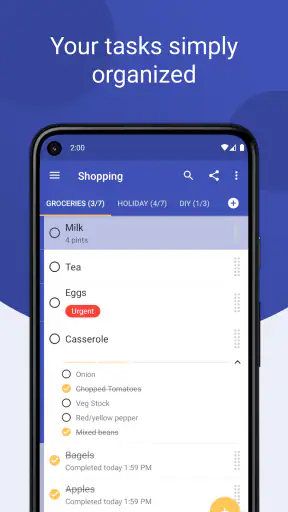
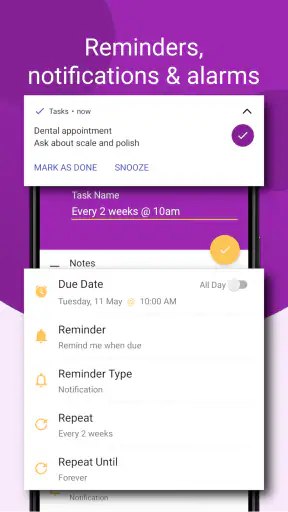
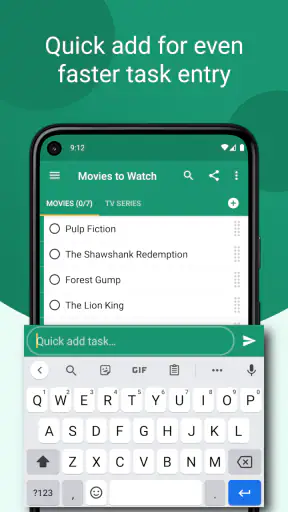
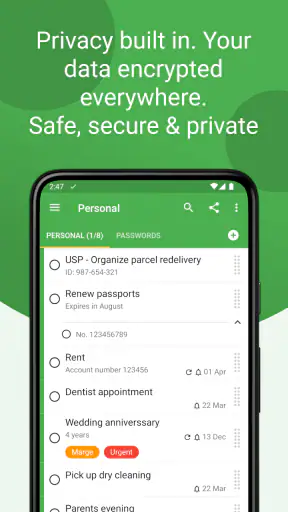
The first thing I noticed is that the app makes sense for tasks that are too important to keep in my head but too small to justify a full planning system. “Book an appointment,” “send the document,” “buy detergent,” and “call the school” all fit naturally. I can treat it as a basic checklist, but reminders give those entries more practical value: a task is not merely written down, it can be brought back to my attention when it matters.
That distinction is useful on busy days. A paper list can disappear under other papers, while a note-taking app often leaves me with a page full of unstructured text. A dedicated task manager sits between those options. I can record an obligation at the moment I think of it and return later to work through it. For personal errands, household jobs, study prompts, and small work follow-ups, this is the level of organization I usually need.
A realistic routine for a busy day
Imagine that I am leaving work and remember three unrelated things: I need to collect a parcel, reply to a message, and prepare ingredients for dinner. I would enter each as its own task rather than writing one vague line such as “sort out tonight.” The parcel can be tied to a useful reminder, the message can remain a short action, and the dinner preparation can wait until the appropriate part of the day. This small separation reduces the chance that one large reminder will hide several unfinished actions.
The same approach works for a weekly reset. I can make a short list for household maintenance, add individual items instead of one oversized “clean the house” task, and remove completed entries as I go. The benefit is not sophisticated planning; it is visibility. I can see what is actually left, which makes it easier to start with the next manageable action instead of negotiating with a vague list.
Where the simple design helps
Many productivity tools try to serve teams, projects, calendars, notes, files, and long-term goals at once. Tasks: To Do List & Reminders is more comfortable when the question is simply, “What do I need to remember and finish?” That narrower purpose lowers the learning curve. I would recommend it to someone who has repeatedly downloaded complex organizers, opened them once, and abandoned them because setting everything up felt like another chore.
It also suits people who want a personal list rather than a shared workspace. A parent managing errands, a student tracking submissions, or a freelancer keeping small client follow-ups together can all understand the basic model quickly. The app’s age rating of Everyone reinforces that broad, everyday positioning, although adults with demanding professional workflows may eventually need capabilities beyond a straightforward task list.
How it compares with familiar alternatives
Compared with a notes app, this is a better choice when completion and reminders matter. Notes are excellent for storing context, but they do not always encourage me to distinguish between something I am saving for reference and something I must do. Compared with a paper planner, the app is more convenient for changing plans and receiving prompts, though some people will still prefer the calm and permanence of handwriting.
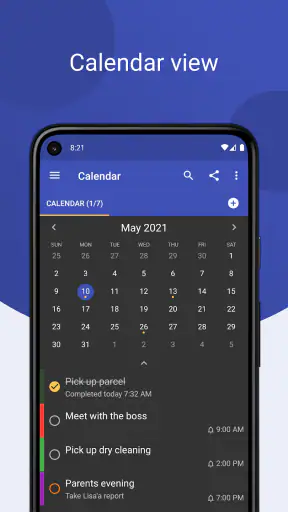
Compared with a calendar, it is better for flexible actions that do not deserve a fixed appointment. I do not need to reserve a precise time merely to remember buying supplies. On the other hand, a calendar remains the stronger tool when travel time, appointments, and overlapping commitments are central. Compared with a large project-management platform, this app is less intimidating but also less suitable for dependencies, team ownership, detailed project documentation, and complex progress reporting.
Small workflows that make it more useful
One of my favorite practical habits is writing tasks as visible actions. “Prepare tax paperwork” is more useful than “taxes,” because the wording tells me what to do when the reminder appears. I also prefer splitting a task when it contains several decisions. “Plan weekend trip” can become “choose destination,” “check transport,” and “reserve accommodation.” This keeps the list honest and prevents a single item from staying open for weeks simply because it was too broad.
A second useful workflow is separating urgent reminders from routine lists. Not every task deserves an alert. If I attach a reminder to everything, notifications become background noise and I start ignoring them. I use reminders for deadlines, time-sensitive calls, and things that would cause real trouble if forgotten. Low-pressure chores can remain on a list for me to review when I have capacity. The strongest result comes from selective reminders, not maximum reminders.
A third tip is to review unfinished items before adding more. A task manager can become a storage box for good intentions. I find it more useful to ask why an item is still open: does it need a new reminder, a clearer action, or deletion because it no longer matters? This habit is especially important in a simple app, because the app can organize entries but cannot decide which commitments are still realistic.
What the current version tells me
The current version is 3.37.1, and that gives the app a more established feel than a brand-new utility. It was released on November 20, 2016, so it has had time to remain relevant in a category where many small organizers come and go. I see that longevity as a positive sign for someone who wants a familiar tool rather than an experimental concept.
At the same time, a version number alone does not tell me how dramatically an app has changed over time. I would not assume that every feature I might want has arrived simply because the product has been maintained. The sensible way to judge it is to focus on the current experience: how quickly I can capture a task, how dependable the reminder workflow feels in my routine, and whether the organization tools match the complexity of my life.
How product evolution affects existing users
For an existing user, a mature task app is valuable when it preserves a quick capture habit while refining the details around it. People who already rely on this app are likely to care less about novelty than about continuity: can they keep their personal system understandable, find current tasks easily, and continue using reminders without rebuilding everything? A long-running product can be reassuring in that respect, but it also means users should periodically review whether their own workflow has outgrown the app.
The developer, Pocket Brilliance Limited, has positioned this product around ordinary productivity rather than a specialized profession. That makes it easier to recommend to family members or friends who need a low-friction starting point. It also means experienced users should be realistic about the trade-off. A tool designed to be approachable may deliberately avoid the layers of configuration that power users enjoy.
Where I still feel friction
The biggest limitation is the same quality that makes the app inviting: simplicity. If I want detailed project hierarchies, extensive notes attached to every action, team collaboration, complex recurring planning, or a deep connection between tasks and a work calendar, a more advanced alternative may serve me better. Adding too many categories or trying to force a large project into a basic task list can create a false sense of control.
There is also a behavioral limitation that no reminder app can completely solve. A notification can bring a task back into view, but it cannot make an unclear task actionable or create time in an overcrowded day. If I keep postponing the same item, the problem may be the wording, the size of the task, or an unrealistic deadline. Tasks helps expose that problem, but I still have to make the decision.
The optional purchase model is another point I would consider carefully. Since the app is free with in-app purchases, I can start without paying, but I should review the available upgrade choices before assuming that every desired capability belongs to the free experience. The broad range from $0.99 to $69.99 per item means the cost can vary substantially depending on what I choose. I would not pay for extras merely because the app is popular; I would first confirm that they solve a specific problem in my routine.
Who should use it, and who should skip it
I would point this app toward someone who wants a clean personal task list, needs reminders, and does not want to learn a complicated system. It is especially suitable for errands, household responsibilities, personal deadlines, study actions, and small work follow-ups. It can also be a good first step for someone moving away from scattered notes and messages toward a more consistent way of tracking commitments.
I would suggest skipping it if the main requirement is team coordination, shared project ownership, detailed time blocking, or a central workspace for documents and conversations. In those situations, a collaborative project tool or calendar-centered system is likely to be a better investment. I would also hesitate to recommend it to someone who already has a reliable planning method and is only looking for more features. Adding another task inbox can increase friction rather than reduce it.
What I would watch before relying on it long term
Before making it the center of my routine, I would test the exact reminder behavior around the tasks that matter most to me. I would create a few examples with different levels of urgency, then see whether the resulting workflow feels clear rather than noisy. I would also check how comfortably I can review unfinished items, because daily use depends more on returning to the list than on creating the first entry.
I would pay attention to whether my needs are becoming more complex. If I start needing project stages, shared responsibility, extensive context, or a separate calendar view, that is a useful signal to compare other tools instead of forcing this one to act like something it was not designed to be. Conversely, if I mostly need a dependable place for personal actions and occasional reminders, its focused nature may remain an advantage.
My final take after using it
Tasks: To Do List & Reminders is not trying to replace every productivity system, and I think that restraint is its main strength. It gives me a practical way to capture actions, remember time-sensitive responsibilities, and make small plans easier to finish. The free starting point, Everyone rating, strong 4.8 average, and wide adoption make it an easy app to try, while the optional purchases mean I would still examine the upgrade path before spending.
My recommendation is straightforward: use it when your problem is forgotten personal tasks, not complicated project management. Start with a small list, write each entry as a clear action, reserve reminders for genuinely important moments, and review unfinished items regularly. If that is enough, this app can become a quiet and useful part of the day. If your work depends on collaboration, deep structure, or calendar precision, I would choose a more specialized alternative instead. Its value is in reducing everyday mental clutter without making organization feel like a second job.


